
- 100% Free & Fully Automated: Download our professionally engineered 2026 Debt Payoff Template formatted natively for Microsoft Excel (.xlsx) and Google Sheets with zero paywalls.
- Dynamic Snowball vs. Avalanche Toggle: Instant automated ranking formulas calculate both the psychological Debt Snowball (lowest balance first) and the mathematical Debt Avalanche (highest APR first).
- Compounding Rollover Engine: When an account reaches $0, its monthly payment automatically cascades into your next debt target, slashing repayment timelines by up to 16 years.
- 100% Bank Privacy: Full financial control without sharing banking logins or paying monthly app subscription fees.
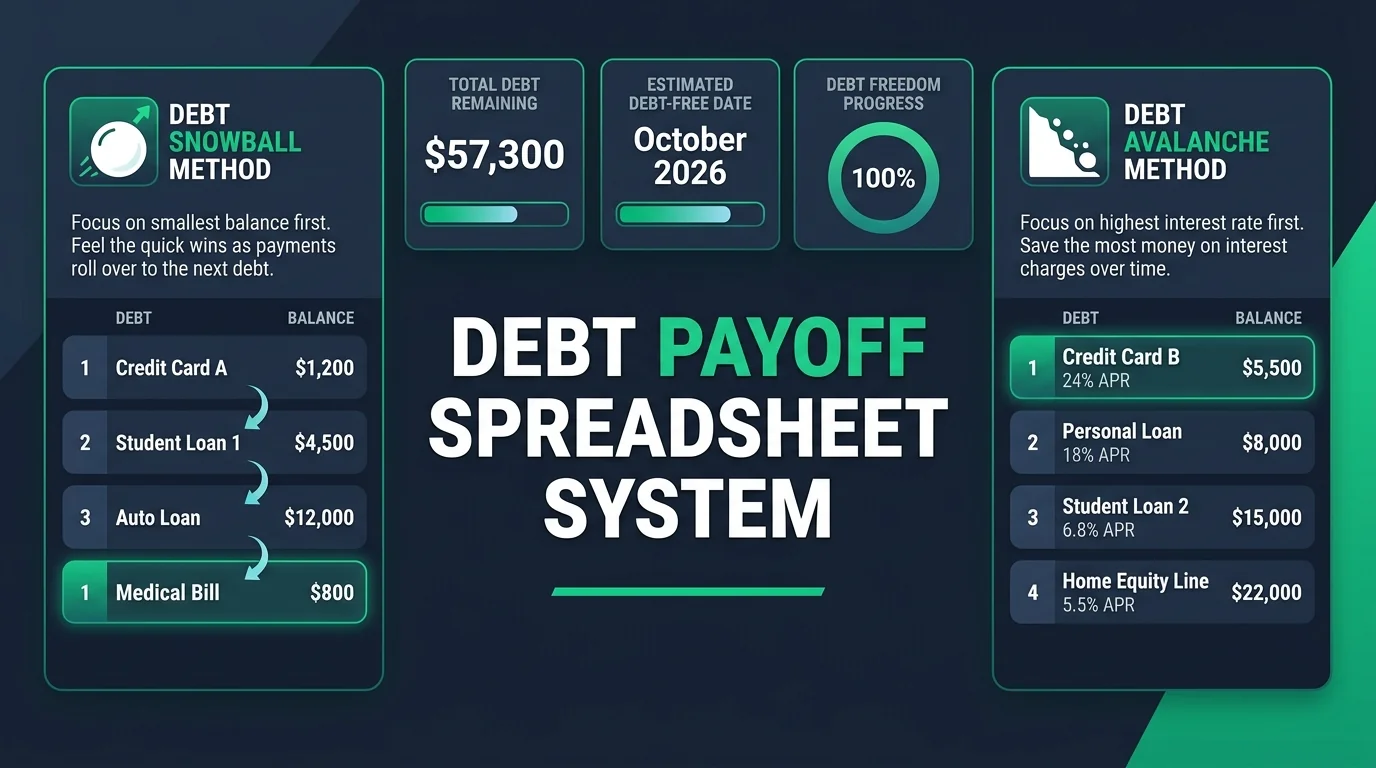
Get direct access to the unlocked Microsoft Excel (.xlsx) workbook and 1-click Google Sheets template with pre-built formulas, KPI dashboard, and 60-month amortization log.
Why a Spreadsheet Outperforms Generic Debt Payoff Apps
Eliminating multiple high-interest credit cards, auto loans, and personal loans requires intense clarity. While commercial mobile apps promise effortless debt management, they frequently present three critical roadblocks:
- Aggressive Subscription Paywalls: Popular debt tracking apps now charge $8 to $15 per month ($96 to $180 annually)—money that should be destroying your loan principal.
- Security & Data Harvesting Risks: Connecting your primary checking and credit card credentials via third-party aggregators exposes your financial telemetry to marketing algorithms and potential data breaches.
- Rigid Mathematical Models: Most consumer apps force you into a single rigid repayment model and fail to simulate custom lump-sum payments, variable interest rates, or promotional 0% APR balance transfer rollovers.
A dedicated, locally-controlled spreadsheet built in Excel or Google Sheets gives you complete mathematical sovereignty. You can project multiple payoff scenarios, audit interest calculations down to the exact penny, and pair your debt elimination strategy directly with our free debt payoff calculator and debt management calculator and monthly budget calculator.
Snowball vs. Avalanche vs. Custom: Choosing Your Winning Strategy
When you input your balances and interest rates into the spreadsheet, you must select how your extra monthly payments will be allocated. Understanding the behavioral and mathematical mechanics between these frameworks is essential for long-term consistency. Read our detailed breakdown on Debt Avalanche vs Snowball: which pays debt faster to see how each performs across different interest rates:
| Payoff Strategy | Target Priority | Primary Advantage | Best Suited For |
|---|---|---|---|
| Debt Snowball | Smallest Balance First | Rapid psychological wins, quick account elimination, high motivation | Borrowers overwhelmed by numerous accounts needing behavioral momentum |
| Debt Avalanche | Highest Interest APR First | Maximum mathematical efficiency, minimizes total interest paid | Analytical borrowers holding high-APR credit cards (24% to 30%+) |
| Hybrid Snowball | Smallest 1–2 accounts, then highest APR | Combines early psychological momentum with long-term interest savings | Borrowers wanting fast early wins before tackling heavy balances |
| Cash Flow Priority | Highest Monthly Minimum First | Rapidly frees up monthly cash flow margin | Families living paycheck-to-paycheck needing immediate budget breathing room |
If you are struggling with cash-flow constraints while managing revolving debt, review our comprehensive framework on debt management strategies and explore debt-free vs strategic leverage approaches to align your debt strategy with long-term wealth building.
Inside the Template: 4 Powerful Modules Built for Debt Freedom
Our free template is engineered with four interconnected worksheets designed to take you from initial debt inventory to total debt elimination:
1. 📊 Executive KPI Dashboard
The main dashboard provides real-time high-level visibility over your entire debt portfolio. Dynamic formula cards automatically summarize:
- Total Starting Debt vs. Current Remaining Balance: Visualizing your progress from Day 1 to today.
- Cumulative Principal Paid Off: Real-time dollar amount destroyed.
- Total Minimum Monthly Commitments: The baseline required to keep all accounts in good standing.
- Monthly Extra Accelerator Input (Cell E9): Enter any extra cash ($50, $200, $400+) to instantly simulate accelerated payoff dates.
- Head-to-Head Payoff Comparison Table: Compares total months to freedom and total interest between Snowball and Avalanche methods.
2. 💳 Debt Accounts & Strategy Matrix
This is your operational engine. Simply input your creditor name, debt category (Credit Card, Auto Loan, Student Loan, Personal Loan, Medical), starting balance, current balance, APR interest rate, and required minimum monthly payment. The sheet automatically executes dynamic rank formulas:
=IF(E6>0, COUNTIFS($E$6:$E$15, ">0", $E$6:$E$15, "<"&E6) + 1, "-")
=IF(E6>0, COUNTIFS($E$6:$E$15, ">0", $F$6:$F$15, ">"&F6) + 1, "-")
=IF(E6=0, 0, G6 + IF(H6=1, '3_Debt_Freedom_Dashboard'!$E$9, 0))
When an account hits $0, the formulas immediately update the status to PAID OFF! 🎉 and recalculate the monthly cash allocation for the remaining debts.
3. 🗓️ 60-Month Amortization & Payment Log
Tracking your actual monthly numbers reinforces positive financial habits. The payment log records your target budget versus actual payments made, total interest charged, monthly principal reduction, and ending portfolio balance across 60 tracking periods.
4. 📘 Setup & Import Guide
Detailed step-by-step instructions built directly inside the spreadsheet explain how to import into Google Sheets, customize formulas, and set up recurring paycheck routines.
Real-Life Payoff Simulation: $28,100 Debt Portfolio
Whether you are tackling a smaller balance or learning how to pay off $20k credit card debt fast, structured momentum is key. To demonstrate the dramatic compounding power of the template’s rollover engine, let’s examine a realistic household debt portfolio totaling $28,100 across five standard consumer loan accounts:
- Chase Sapphire Visa: $1,850 balance at 28.99% APR (Min: $55/mo)
- Discover It Card: $3,200 balance at 24.49% APR (Min: $85/mo)
- Citi Double Cash Card: $4,600 balance at 22.99% APR (Min: $120/mo)
- SoFi Personal Loan: $5,000 balance at 11.99% APR (Min: $140/mo)
- Capital One Auto Loan: $12,500 balance at 7.49% APR (Min: $285/mo)
- Total Required Minimum Monthly Payments: $685.00 / month
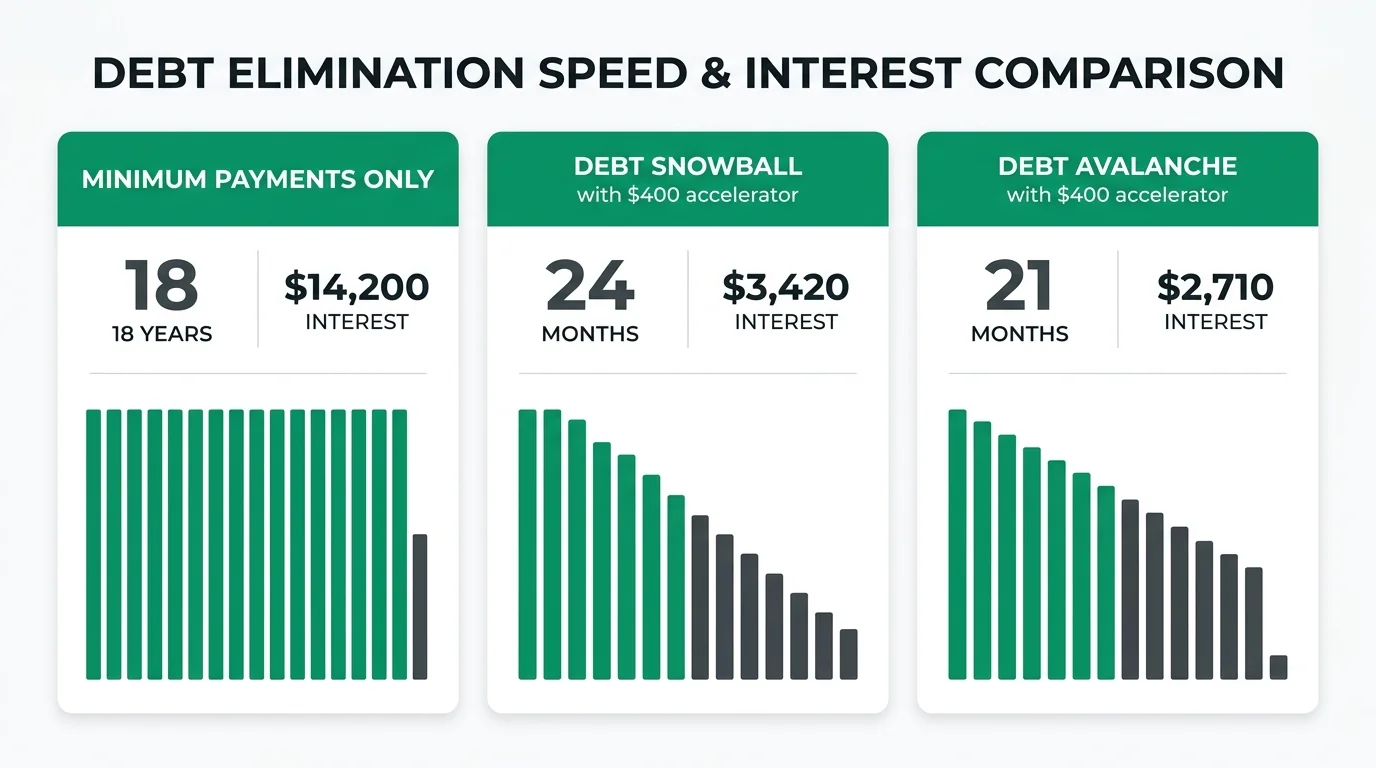
| Repayment Strategy | Monthly Commitment | Payoff Timeline | Total Interest Paid | Total Money Saved |
|---|---|---|---|---|
| Minimum Payments Only | $685.00 / month | 18.5 Years | $14,200.00 | $0.00 (Baseline) |
| Debt Snowball (+$400 Accelerator) | $1,085.00 / month | 24 Months (2.0 Yrs) | $3,420.00 | $10,780.00 Saved |
| Debt Avalanche (+$400 Accelerator) | $1,085.00 / month | 21 Months (1.75 Yrs) | $2,710.00 | $11,490.00 Saved |
By adding an extra $400 monthly accelerator and leveraging the automatic rollover mechanism in our spreadsheet, this borrower cuts their payoff timeline from 18.5 years down to under 2 years and saves over $11,400 in non-deductible interest charges!
Video Walkthrough: Debt Snowball vs. Debt Avalanche Explained
Watch this authoritative visual breakdown comparing how the Debt Snowball and Debt Avalanche strategies function in real-world scenarios to decide which approach to prioritize in your spreadsheet:
Step-by-Step Guide: Setting Up the Template in Google Sheets & Excel
Follow this 5-minute setup blueprint to get your debt payoff dashboard fully operational on your computer or mobile device:
For Google Sheets Users (100% Cloud & Mobile Synced):
- Download the .xlsx file: Click the green download button above to save the template file to your computer or phone.
- Upload to Google Drive: Open Google Drive in your browser, click the + New button in the top left corner, and select File upload.
- Open as Google Sheet: Double-click the uploaded file in Google Drive, then click Open with Google Sheets at the top.
- Save as Native Google Sheet: Click File > Save as Google Sheets. This creates a permanent cloud version that updates seamlessly on your phone, tablet, or laptop.
For Microsoft Excel Users (Desktop & Office 365):
- Open File: Double-click the downloaded
.xlsxfile to launch in Microsoft Excel. - Enable Editing: If prompted with a yellow security banner, click Enable Editing at the top.
- Save to OneDrive (Optional): Save the file to your personal OneDrive folder if you want auto-save and multi-device synchronization.
Before launching an aggressive debt repayment blitz, review our guide on paying off debt vs saving an emergency fund to ensure you strike the optimal balance between safety and payoff velocity. Explore our guide on how to save your first $1,000 and use our emergency fund calculator so unexpected car repairs or medical bills never push you back into credit card debt.
5 Common Spreadsheet Mistakes That Derail Debt Payoff
To ensure your debt payoff spreadsheet drives real-world results, avoid these five common pitfalls:
- Lowering Your Total Monthly Payment as Minimums Drop: As credit card balances fall, card issuers automatically lower your required minimum payment. If you only pay the new lower minimum, your payoff velocity collapses. Always keep your total monthly debt budget fixed so the excess cash rolls into principal reduction.
- Forgetting Variable APR Fluctuations: Credit card APRs fluctuate with federal interest rate adjustments. Audit your monthly credit card statements and update the APR column on Tab 2 every quarter. If your rates are above 25%, use our word-for-word call scripts on how to negotiate credit card interest rates or ask your bank about credit card hardship programs to temporarily drop rates to 0%–9%.
- Operating with Zero Cash Cushion: If you put every spare dollar toward debt without keeping a $1,000 starter emergency fund, a single minor car repair will force you right back onto high-interest credit cards.
- Ignoring 0% Balance Transfer Opportunities: If you have good credit (680+), transferring high-interest balances (24%–30%) to one of the best 0% APR balance transfer cards or securing a low-interest personal loan via debt consolidation vs balance transfer can save thousands in interest during your repayment blitz.
- Skipping Monthly Reconciliation: Spend 10 minutes on the first of each month updating your current balances and recording payments on the Monthly Payment Log tab. Consistency builds financial mastery.
For more actionable budgeting techniques to free up extra cash each month, read our in-depth blueprint on how to budget a $3,000 monthly income.
Frequently Asked Questions (FAQs)
Below are clear, actionable answers to the most common questions regarding our free debt payoff Excel and Google Sheets template:
Download the free .xlsx file to your computer, open Google Drive (drive.google.com), click ‘+ New’ -> ‘File upload’, and select the downloaded file. Once uploaded, right-click the file and choose ‘Open with Google Sheets’. Click ‘File’ -> ‘Save as Google Sheets’ for full cloud syncing and mobile access.
The Debt Avalanche mathematically saves the most money by targeting high-interest APR accounts first (saving hundreds or thousands in interest). However, the Debt Snowball builds powerful behavioral momentum by knocking out small balances first. Our free template automatically calculates both side-by-side so you can toggle between them instantly.
Yes, 100% free with zero paywalls, zero subscription fees, and no required credit card or email sign-up. You get the full unlocked workbook including the KPI Dashboard, Strategy Matrix, 60-Month Payment Log, and Setup Guide.
When an account balance reaches $0, its minimum monthly payment is not absorbed back into your lifestyle; instead, the formula automatically adds that freed-up cash to the next priority debt’s monthly allocation, creating an exponential compounding payoff effect.
Yes! On the ‘🗓️ Monthly Payment Log’ tab, you can input your exact actual payment for any specific month. If you put a $1,500 tax refund toward your top-priority debt in March, the portfolio balance and interest projections automatically update.
Yes. You can enter 0.00% APR for your balance transfer account and set your monthly allocation to pay off the entire balance before the promotional 12-to-21-month period expires, ensuring you never incur deferred interest charges.
The template is pre-configured for up to 10 separate debt accounts (credit cards, auto loans, personal loans, student loans, medical bills). You can easily insert additional rows by copying the existing formula formulas downward without breaking any dashboard links.
Spreadsheets provide 100% data privacy (no bank credentials linked), zero recurring subscription fees, total offline availability, and custom mathematical control. Unlike apps that just display past spending, our spreadsheet actively projects your exact debt-free date under multiple payoff scenarios.
Summary: Take Total Control of Your Debt Freedom Journey
Eliminating debt is not just a mathematical challenge—it is an exercise in habit formation, discipline, and consistent visibility. By utilizing our free Excel and Google Sheets template, you transform scattered loan balances into an organized, automated debt-destruction machine.
Download the free template today, list your debt accounts, choose your payoff strategy, and watch your debt freedom progress bar hit 100%!

Jaiveer Hooda is the Lead Financial Researcher & Personal Finance Analyst at Grow Your Money Smart. Specializing in personal wealth optimization, index fund compounding, high-yield savings mechanics, and consumer debt elimination strategies. With a background in computer engineering, he applies mathematical modeling, cashflow simulations, and empirical risk analysis to evaluate personal finance vehicles and credit products. Every analysis is backed by verified regulatory disclosures, IRS tax schedules, and empirical APY compounding math.
Areas of Expertise: Personal Finance · High-Yield Savings Accounts (HYSA) · Index Funds & S&P 500 Compounding · Retirement Planning (401k/IRA) · Debt Optimization · Credit Card APR Mechanics.
Transparency & Editorial Policy: Editorial Standards | Report a Correction