
Our free monthly budget spreadsheet for Google Sheets and Microsoft Excel combines an automated cash flow tracker, 50/30/20 split visualizer, debt payoff calculator, and rolling net worth dashboard. It is 100% free forever with no subscriptions, bank logins, or privacy risks.
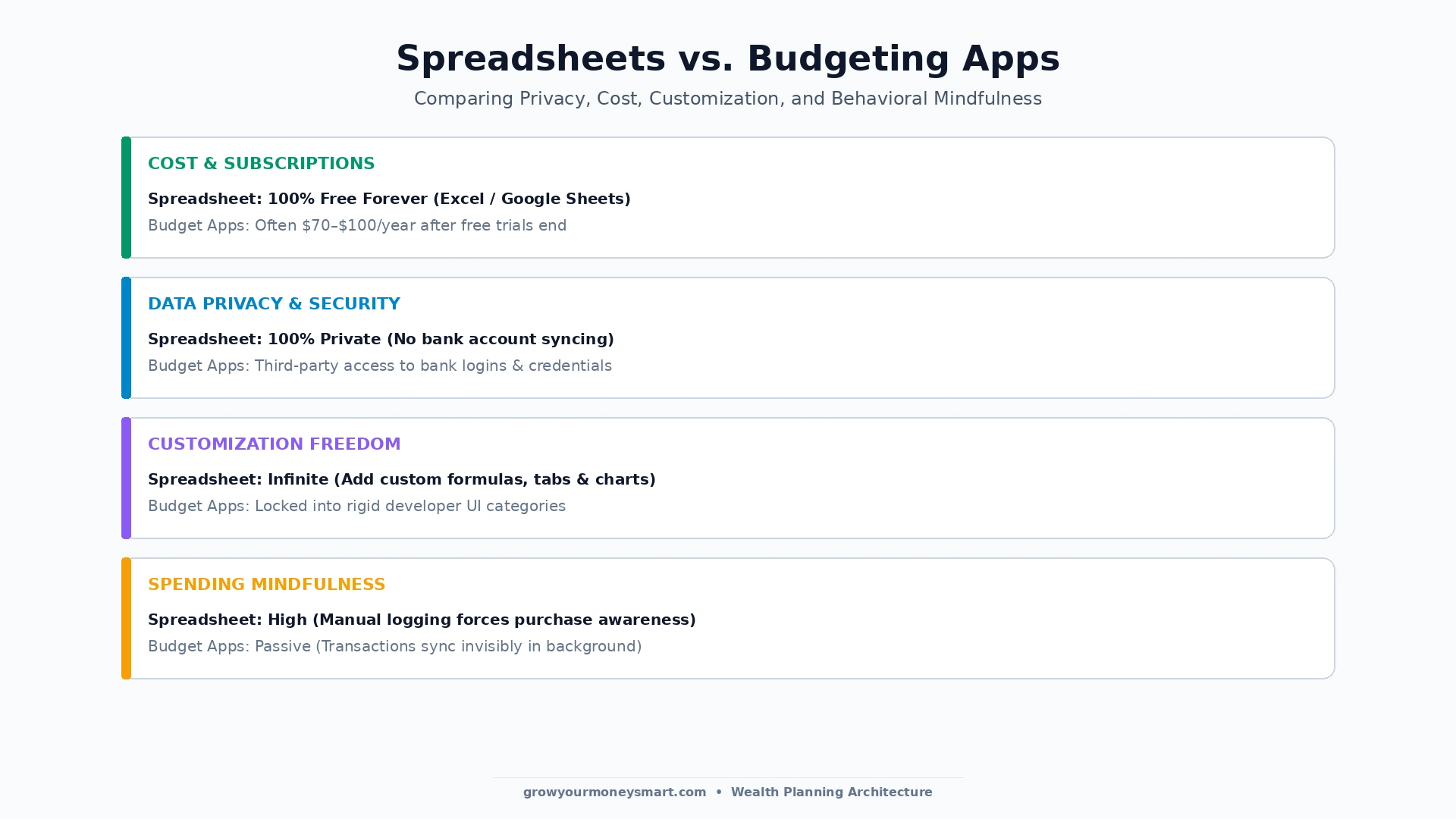
- 100% Free Forever: Unlike commercial apps that charge $70–$100 annually, this template runs natively in Excel and Google Sheets with zero recurring costs.
- Complete Privacy: Never connect sensitive banking credentials to third-party servers. Your financial data stays 100% private in your own drive.
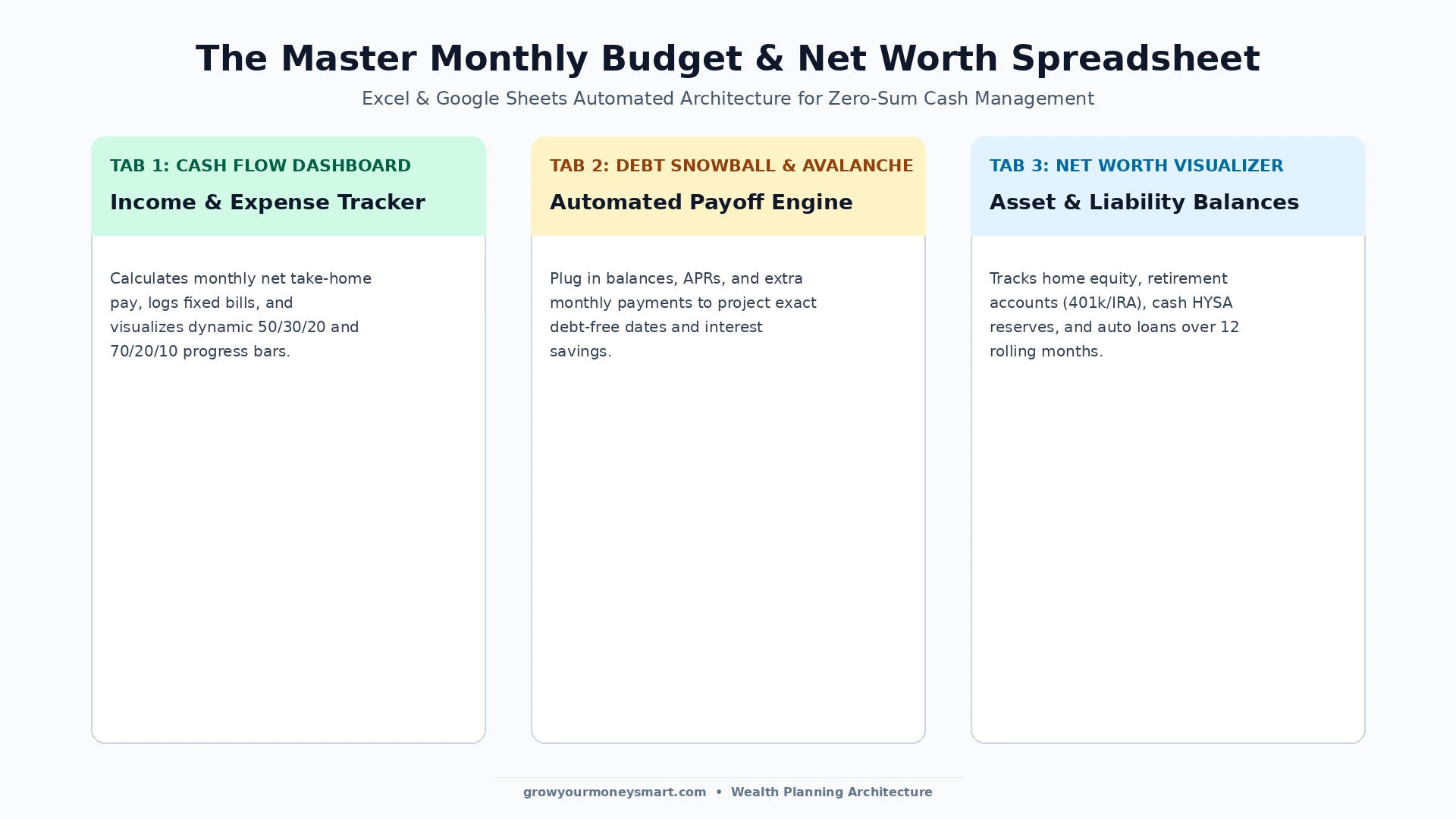
- Multi-Tab Architecture: Includes 1) Cash Flow & Expense Tracking, 2) 50/30/20 & 70/20/10 Allocations, 3) Debt Payoff Snowball, and 4) Net Worth Visualizer.
- Psychological Mindfulness: Manually logging transactions creates spending awareness that passive automated apps completely fail to cultivate.
- Companion Template: Also download our specialized free debt payoff template for advanced multi-loan snowballs.
100% Free Forever • Multi-Tab Automation • Works with Microsoft Excel, Google Sheets, & Apple Numbers
In an era where every personal finance tool wants to charge you a $9.99 monthly subscription or force you to link your private bank credentials to third-party servers, the humble spreadsheet remains the undefeated champion of personal cash flow management.
Studies consistently demonstrate that individuals who track their finances using a dedicated spreadsheet save an average of 15% more money per year than those who rely on passive automated apps. Why? Because the deliberate act of logging transactions creates emotional mindfulness that curtails impulse spending before it starts.
Whether you are budgeting on a $4,000 salary, a $5,000 monthly income, or our irregular income blueprint, this free Excel and Google Sheets template provides the exact formulas, category structures, and net worth charts you need to master your wealth.
Spreadsheets vs. Paid Budgeting Apps: Why Simple Wins
Before paying for expensive software, evaluate the fundamental trade-offs between spreadsheets and subscription apps:
The 4 Core Tabs Inside the Master Template
- 1. Monthly Cash Flow Dashboard: Logs your take-home pay, breaks down fixed living expenses, tracks discretionary spending, and visually displays whether you are meeting your 50/30/20 or 70/20/10 budget targets.
- 2. Sinking Fund Tracker: Organize up to 8 dedicated sinking funds (car maintenance, vacations, holiday gifts) as outlined in our guide on What Is a Sinking Fund?.
- 3. Debt Payoff Snowball & Avalanche: Plug in your credit cards, car notes, or student loans to calculate your exact debt-free date. (Pair with our interactive debt payoff calculator).
- 4. 12-Month Net Worth Tracker: Track liquid assets in your High-Yield Savings Account, retirement compounding in your 401(k) and Roth IRA, and watch your net worth march toward seven figures.
User Guide: What to Edit vs. What NOT to Touch (Protect Your Formulas)
To ensure your monthly budget calculates correctly and never throws formula errors, follow this visual guide on which cells to customize and which to leave automated:
🟢 What You SHOULD Edit
- Income Sources: Enter your expected take-home pay, side hustles, or freelance checks in Tab 1.
- Planned Budget Numbers: Customize budgeted amounts for your rent, groceries, and dining out.
- Daily Transactions: In Tab 2, log your date, category, store description, payment method, and dollar amount spent.
- Sinking Fund Targets: Enter upcoming goal amounts, target deadlines, and current savings in Tab 3.
- Asset & Debt Balances: Update your current bank accounts, retirement funds, and credit card balances in Tab 4.
🔒 What You Should NOT Touch
- TOTAL & Sum Rows: Any cell displaying
[LOCKED]or double bottom underlines automatically sums data above. Overwriting destroys totals. - Summary Metric Cards: The 4 top cards (Total Income, Total Expenses, Net Cash Flow, Savings Rate) calculate live via math formulas.
- Difference ($) & % Columns: Automatically subtracts actual spending from your budget to show variance.
- Monthly Needed Column: In Tab 3, the formula divides your remaining goal by months left automatically.
- Total Net Worth Cell: The grand total cell on Tab 4 calculates
Total Assets - Total Liabilitiesautomatically.
Expert Video Breakdown: Setting Up Your Monthly Budget Spreadsheet
For a step-by-step visual demonstration on how to track income, categorize fixed expenses, and calculate net savings in a spreadsheet, watch WhiteBoard Finance’s walkthrough:
Frequently Asked Questions (FAQs)
Yes, absolutely. The spreadsheet template is 100% free to download and use in both Microsoft Excel and Google Sheets, with no subscription fees, no locked formulas, and no credit card required.
Yes. The template is fully compatible with Google Sheets (cloud-based and accessible via phone/tablet) and Microsoft Excel (.xlsx format for offline desktop use).
Spreadsheets offer 100% data privacy (you never have to link your sensitive bank login credentials), infinite customization, zero subscription costs, and greater psychological mindfulness over your spending.
We recommend a quick 5-minute weekly check-in to log recent transactions, followed by a 15-minute monthly review on the final weekend of each month to rebalance categories and update your net worth tab.
Yes. The dashboard tab automatically calculates and charts your exact percentage allocations across Needs, Wants, and Savings based on your logged income and expenses.
Yes. The spreadsheet includes a dedicated Net Worth Tracker tab where you log your cash accounts, retirement assets, home equity, and liabilities to visualize your 12-month net worth growth.
Yes. Your data remains stored in your personal Google Drive account secured by Google’s encryption and two-factor authentication. No third party ever has access to your private spreadsheet.
Open the Google Sheets link, click ‘File’ in the top menu, and select ‘Make a copy’ to save your personal editable version directly to your own Google Drive.

Jaiveer Hooda is a personal finance researcher and the founder of Grow Your Money Smart. With a background in computer engineering, he approaches money the way an engineer approaches any complex system — through data analysis, mathematical modeling, and ruthless optimization.
He built this platform on a single conviction: financial freedom is not a matter of luck. It is a system that can be designed, tested, and executed by anyone willing to follow the right blueprint. Every strategy published here is researched to the numbers, not written to the trend.
Expertise: Debt elimination · Retirement planning · Passive income · Budgeting systems
Connect: Pinterest | growyourmoneysmart.com | Contact Us