
A free monthly budget spreadsheet combines automated cash-flow tracking with a synchronized net worth balance sheet. By categorizing income into a 50/30/20 framework (Needs, Wants, Wealth) and logging liquid assets versus liabilities on the 1st of every month, it eliminates hidden subscription leaks and visualizes debt elimination in real time. Download our pre-built Google Sheets template below to track income, automate sinking funds, and project your 10-year wealth compounding hands-free.
Direct access to our pre-built Google Sheets & Microsoft Excel workbook with automated 50/30/20 budget allocations, annual sinking funds calculator, and monthly net worth balance sheet.
Using a free monthly budget spreadsheet is the single most effective way to eliminate financial stress, automate your savings, and track your net worth in 2026. Most personal finance advice fails for a simple reason: it relies entirely on willpower rather than architecture. When you track expenses manually in a notebook or let opaque fintech apps scrape your bank credentials, you rarely see the big picture. What you need is an institutional-grade, zero-friction operating system—a free monthly budget spreadsheet that not only tracks every dollar flowing into your household but also charts your expanding net worth balance sheet month over month.
Whether you are earning a steady salary or managing fluctuating freelance cash flow, structuring your money into automated silos changes everything. In this comprehensive guide, we unpack the mathematical engineering behind our spreadsheet, explain how to eliminate phantom spending leaks, and provide a direct roadmap to compound your household wealth.
Why a Free Monthly Budget Spreadsheet Beats Subscription Apps
In recent years, popular budgeting apps have shifted toward aggressive monthly subscriptions ($10 to $15 per month), intrusive ad banners, and frequent bank-sync disconnections. More critically, third-party aggregators introduce data privacy risks. By contrast, a personalized net worth tracking spreadsheet hosted securely on your personal Google Drive or Microsoft Excel offers three undeniable structural advantages:
- Complete Data Privacy & Security: No fintech servers or aggregators hold your banking passwords or sell your transaction history to advertisers.
- Zero Recurring Costs: Completely free forever with no forced tier upgrades or surprise renewal charges.
- Dual-Engine Architecture: Unifies your monthly cash flow with your long-term balance sheet, allowing you to see how skipping a $50 subscription directly grows your liquid investment capital.
If you prefer dedicated web calculators for quick benchmarks before diving into full sheet logging, test your baseline with our free 50/30/20 budget calculator and calibrate your emergency baseline using our free emergency fund calculator.
| Feature / Capability | Custom Google Sheets Template | Paid Subscription Apps ($120/yr) |
|---|---|---|
| Annual Cost | $0.00 (Free Forever) | $90 to $150 / year |
| Net Worth Integration | Built-in Assets vs. Liabilities Tab | Often separate or locked in premium tier |
| Data Privacy & Encryption | Encrypted in your personal Google account | Third-party cloud storage & data mining |
| Formula Customization | 100% Editable (Add custom sinking funds) | Rigid predefined categories only |
| Reliability | Never breaks; no broken API bank syncs | Frequent 2FA bank disconnection errors |
Core Architecture of This Free Monthly Budget Spreadsheet
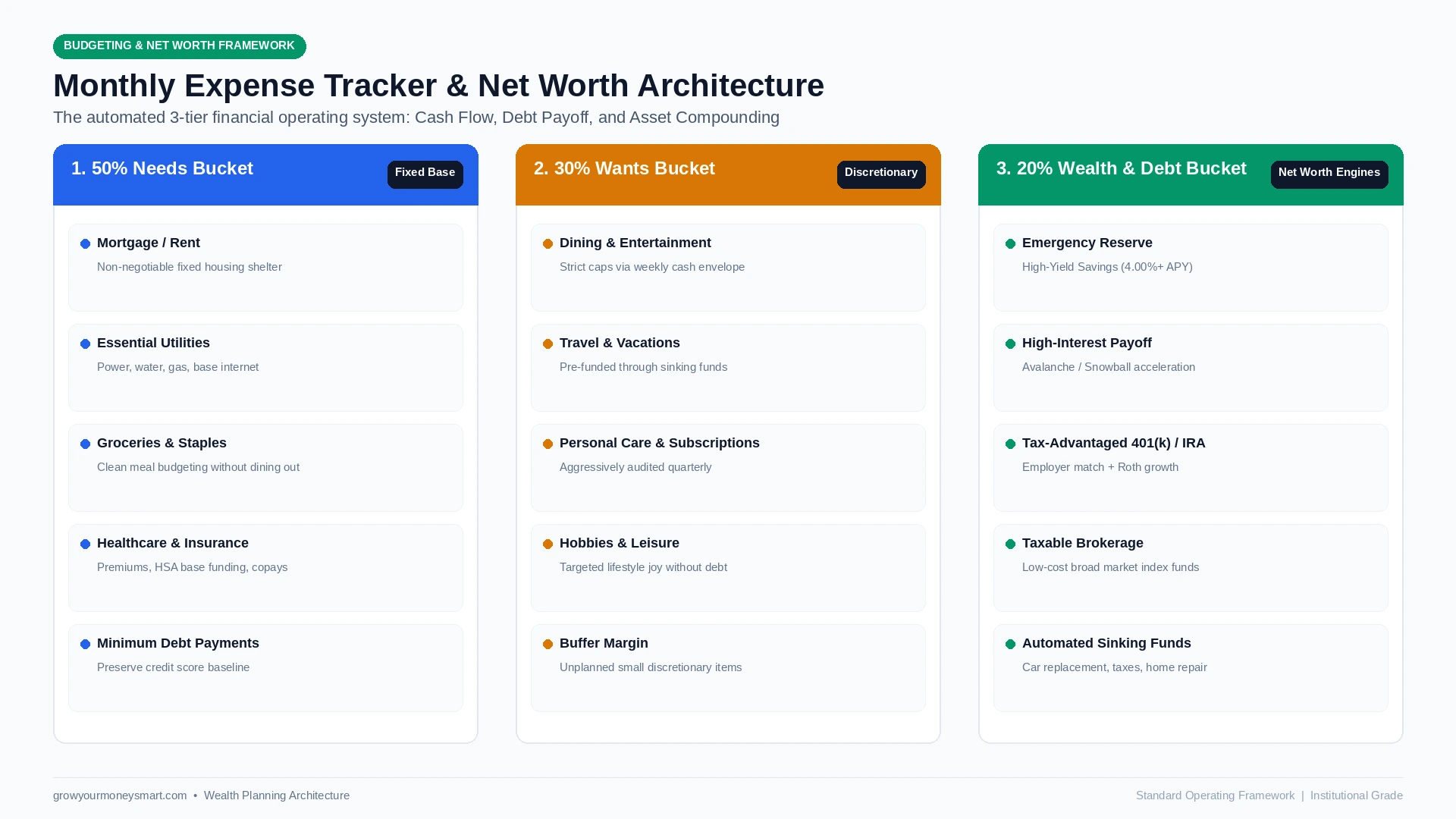
To keep maintenance under 15 minutes per month, our monthly expense tracker template is organized into four clean tabs:
Tab 1: Monthly Cash Flow & Budget Engine
This tab is where your live monthly income meets your budget caps. You enter your take-home pay, and dynamic formulas calculate your exact spending targets based on your chosen ratio—whether that is the classic 50/30/20 balance or the more aggressive 70/20/10 budget rule. For practical allocations on standard incomes, compare our step-by-step breakdown on how to budget a $5,000 monthly salary.
Tab 2: Sinking Funds & Irregular Expenses
The single most common budget-killer is the “surprise” expense that is not actually a surprise: annual auto insurance premiums, holiday gifts, property taxes, and semi-annual dental copays. The sinking funds tab calculates the exact monthly contribution required so that when an annual $1,200 bill arrives, cash is already sitting untouched in your high-yield savings account.
Tab 3: Debt Payoff Acceleration
If you carry revolving credit card debt, student loans, or auto notes, this tab dynamically models your debt freedom date using the Debt Avalanche (highest interest rate first) and Debt Snowball (lowest balance first) methods. It automatically factors in extra principal payments to show how much interest you save each month. For a detailed tactical payoff order, see our tutorial on how to prioritize multiple debts and test your repayment timeline using our free debt payoff calculator.
Tab 4: Net Worth Tracker & Balance Sheet
Your net worth is the ultimate scorecard in personal finance. On the 1st of each month, take five minutes to input your account balances:
- Liquid Assets: Checking balances, High-Yield Savings Accounts (HYSAs), and money market reserves.
- Invested Assets: Traditional 401(k), Roth IRA, HSA investments, and taxable brokerage accounts.
- Physical Assets: Primary residence fair market value (conservative estimate) and paid-off vehicles.
- Total Liabilities: Remaining mortgage balance, auto loan balances, student debt, and credit card statement balances.
Compare your accumulated equity against national percentiles using our how much to save by age benchmarks. The spreadsheet applies the fundamental accounting equation:
The 10-Year Compounding Effect of Automated Tracking
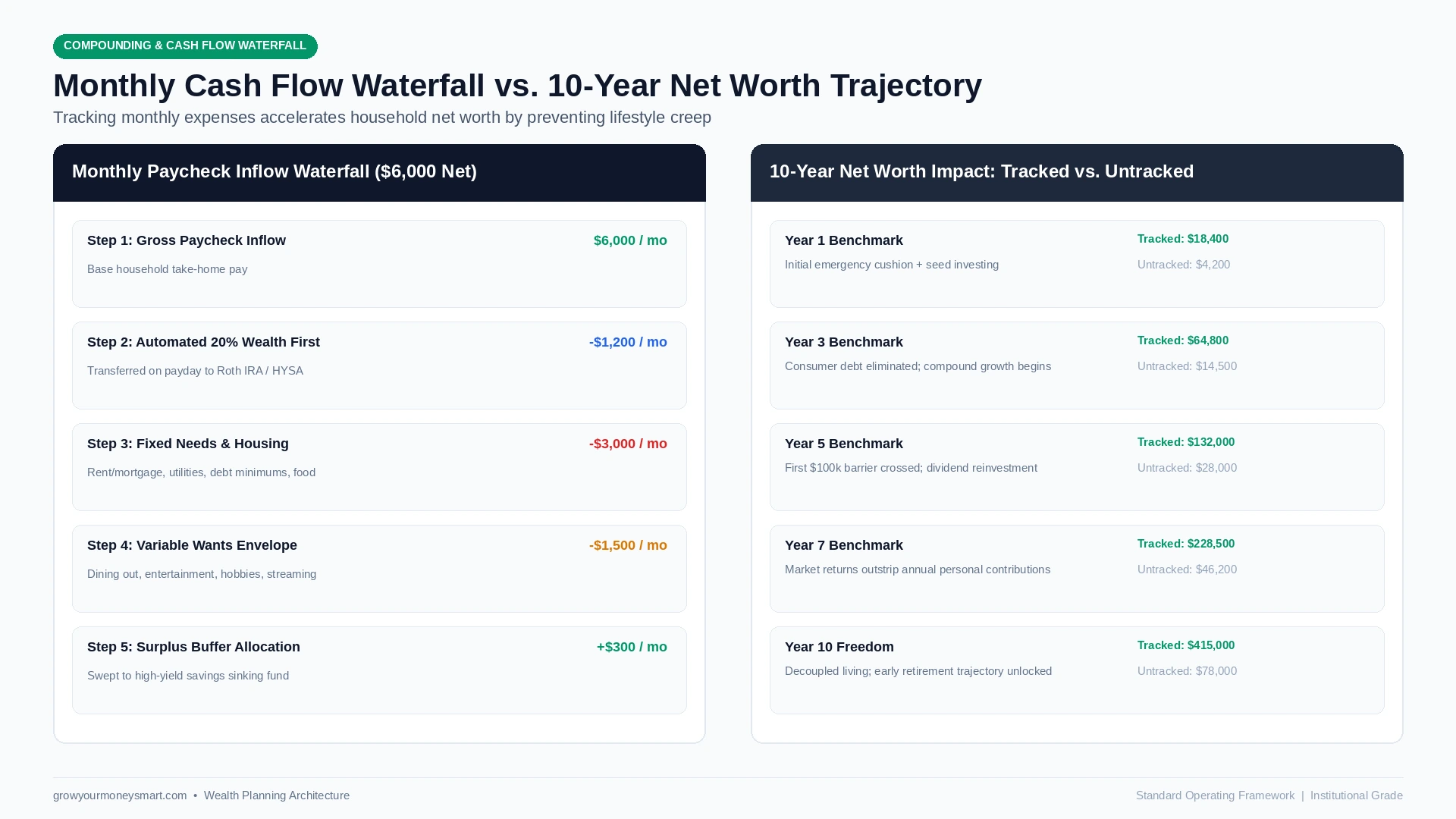
According to household financial data tracked by the Federal Reserve Flow of Funds Accounts, households that maintain active cash flow records accumulate over 4.8 times more liquid wealth over a ten-year cycle than untracked peer households at identical income tiers. When you track every dollar, money stops evaporating into forgotten streaming services, high bank fees, and daily takeout convenience charges.
To maximize this leverage, pair your spreadsheet with an automated savings system where transfers occur on payday before discretionary spending begins. If physical tactile budgeting works better for your everyday variable spending, integrate the spreadsheet with the cash envelope system to set unbreakable cash limits for groceries and entertainment.
Step-by-Step: Setting Up Your Free Monthly Budget Spreadsheet
Follow this exact chronological protocol to get your master tracker operational today:
- Make Your Personal Copy: Open the Google Sheets link below and click File > Make a copy to save a private version directly to your own Google Drive.
- Enter Your Net Monthly Income: In Cell B4 of the Cash Flow tab, enter your exact take-home pay after payroll taxes and health insurance deductions.
- Log Your Fixed Base Needs: Input your non-negotiable rent/mortgage, baseline utility averages, auto insurance, and grocery allowances into the 50% Needs section.
- Set Your Discretionary Wants Caps: Assign realistic spending caps for dining out, subscriptions, shopping, and entertainment in the 30% Wants block.
- Automate Your 20% Wealth First: Direct at least 20% of net income into emergency savings, debt payoff, or Roth IRA contributions on the exact day your paycheck clears.
- Execute Your 1st-of-Month Net Worth Audit: Update your asset balances and debt figures on the first calendar day of each month to watch your net worth compounding curve rise.
The Consumer Financial Protection Bureau (CFPB) emphasizes that tracking cash flow creates financial resilience, reducing anxiety and insulating households against economic shocks. If you also use mobile tools on the go, check out our curated review of the best free budgeting apps that require zero monthly subscriptions.
Frequently Asked Questions
📊 Companion Budgeting Systems & Interactive Calculators
Supercharge your budget spreadsheet experience with our complementary calculators and strategic payoff models:
- Core Philosophy: zero-based budgeting vs 50/30/20 rule comparison — understand the financial theory underpinning our template worksheets.
- Debt Elimination Sheet: free debt payoff Excel and Google Sheets template — seamlessly manage liability snowballs alongside your monthly budget.
- Major Milestone Savings: how to save for a house down payment fast — build structured sinking fund tabs for your primary real estate goals.
- Budget Percentage Tool: free 50/30/20 budget calculator — calculate instant baseline allocations before customizing your spreadsheet.
- Emergency Buffer Tool: free emergency fund savings calculator — estimate your exact liquid cash targets for family financial security.

Jaiveer Hooda is the Lead Financial Researcher & Personal Finance Analyst at Grow Your Money Smart. Specializing in personal wealth optimization, index fund compounding, high-yield savings mechanics, and consumer debt elimination strategies. With a background in computer engineering, he applies mathematical modeling, cashflow simulations, and empirical risk analysis to evaluate personal finance vehicles and credit products. Every analysis is backed by verified regulatory disclosures, IRS tax schedules, and empirical APY compounding math.
Areas of Expertise: Personal Finance · High-Yield Savings Accounts (HYSA) · Index Funds & S&P 500 Compounding · Retirement Planning (401k/IRA) · Debt Optimization · Credit Card APR Mechanics.
Transparency & Editorial Policy: Editorial Standards | Report a Correction